How to Separate Stems in Premiere Pro and After Effects (2026)
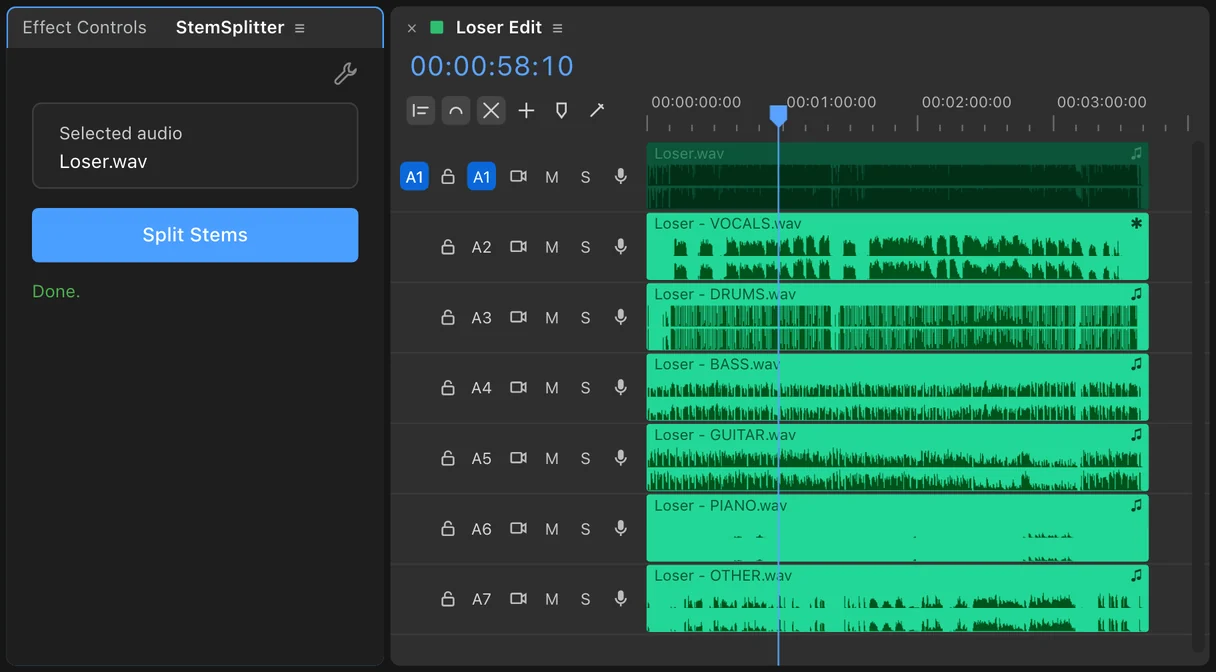
To separate stems in Premiere Pro, you need a stem splitter. Premiere's released tools treat a song as one piece of audio: they can clean dialogue, duck music and change a song's length, but they can't hand you the drums on one track and the bass on another. You either export the song to a website and line the stems back up, or use an extension that splits it on your timeline. StemSplitter does the second: select the song, click once, and six clips (vocals, drums, bass, guitar, piano and other) land under it, lined up.
Editors want stems for a handful of reasons. You want to cut on the drums without the guitar hiding the hits. The voiceover fights a lead guitar, so you turn just the guitar down. The client wants a drumless intro, or the song without bass under a quiet scene. In After Effects, you want a logo to pulse on the kick instead of on the whole mix. This guide covers what Adobe's tools can do, the web round trip, the one-click way, and which stems come out cleanest.
Can Premiere split a song into stems on its own?
Not in the released version. Here's what each built-in tool does with music.
- Essential Sound and Enhance Speech are built for dialogue. They can make a voice clearer and duck music under it. The music stays one clip.
- Remix (Essential Sound panel, Music, Duration) makes a song longer or shorter by rearranging its sections. It doesn't separate instruments.
- EQ and filters can cut low end or high end, but instruments share frequencies. A low-pass filter keeps the kick and the bass together, and a vocal sits right on top of the guitar and piano.
- Enhance Audio in the Premiere beta (version 27.0, announced 2 September 2026) splits a recording into speech, music, ambience, sound effects and reverb. Music comes out as one part, so the drums, bass and guitar are still glued together. When users asked for drums and bass on separate tracks, Adobe's community manager said it was "in our radar" (30 July 2026).
After Effects has no built-in stem separation either. Its Convert Audio to Keyframes reads the whole mix, which is why the kick-drum trick later in this guide needs a drum stem.
| Method | Where it runs | Separate instrument stems? | Cost | The catch |
|---|---|---|---|---|
| EQ or filters | Premiere and After Effects | No | Included | Instruments share frequencies |
| Enhance Audio (beta) | Premiere beta | No, music stays one part | Included | Built for dialogue |
| Web splitter | Browser | Yes, varies by site | Per minute or monthly | Export, upload, download, realign |
| Resolve Studio Music Remixer | DaVinci Resolve | 5 stems as faders on one clip | $295 | A second editor |
| SoundXtract | Premiere | 4 stems | $9.99 to $24.99 a month | Subscription, clip limits, Premiere only |
| StemSplitter | Premiere and After Effects | 6 stems on 6 tracks | $99 once | Six tracks to manage if you only need vocals gone |
Method 1: the round trip with a web splitter
Nothing to install, but several hops.
- Export the song as a WAV, or better, use the original file. A full, uncompressed source separates cleaner.
- Upload it to a stem-splitting site and choose the stems you want. Sites differ: some give four (vocals, drums, bass, other), some more.
- Preview the busiest section before you download. Separation fails first where everything plays at once.
- Download every stem as WAV. Free tiers often give MP3s only.
- Import the stems and place each one on its own track, starting at exactly the same frame as the original. Turn the original off.
Step 5 is the slow part, and you repeat the whole trip each time the client changes the song. The audio also leaves your computer, which unreleased music and many NDAs don't allow.
Method 2: one click inside Premiere or After Effects
This is what StemSplitter does.
- Install StemSplitter with the free aescripts + aeplugins Manager app.
- Open the StemSplitter panel in Premiere or After Effects.
- Select the song on your timeline.
- Click Split Stems.
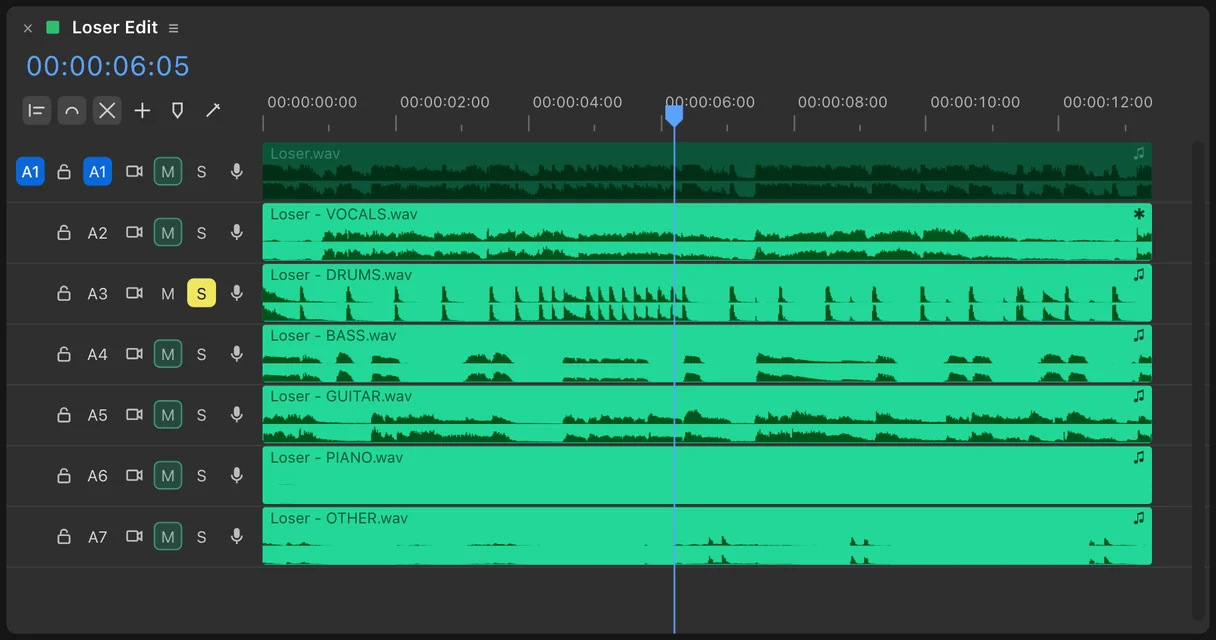
- Six clips appear on the tracks under the song in Premiere, or as six layers under it in After Effects, all starting at the same point. The original is switched off, not deleted.
From there the stems are ordinary clips. Solo the drums to find your cut points, mute the bass for a lighter version, or drop the guitar 6 dB under the voiceover.
Which stems come out cleanest
StemSplitter runs a BS-RoFormer model on your machine. The model's published quality scores (signal-to-distortion ratio, higher is cleaner) are:
| Stem | Score (dB SDR) |
|---|---|
| Bass | 14.62 |
| Drums | 14.11 |
| Vocals | 11.30 |
| Guitar | 9.05 |
| Other | 8.71 |
| Piano | 7.83 |
Drums and bass are the strongest, which is lucky, because they're the stems editors cut to. Guitar and piano are the hardest: they overlap each other and the "other" stem, so expect some bleed when you solo them. In the full mix it disappears.
Two numbers from our own tests. The six stems sum back to the original song with a residual of -30.5 dB (a correlation of 0.9996), so muting nothing gives you the song you started with. And on an M5 Mac, a 30-second clip splits in about 13 seconds.
Tips for a cleaner split
- Start from the best file you have. A WAV or the original release beats a YouTube rip.
- Split the whole song, then cut. The model hears more context, and you can trim the stems like any clip.
- Check the densest section (the last chorus, the drop) before you build an edit on a stem.
- Keep the original. It's switched off on its own track, so you can always compare or go back.
Can you use the stems after splitting?
Splitting a song doesn't change who owns it. Every stem is still part of the original recording, and Content ID can still match it. Use stems from music you have the rights to: a licensed library track, a song the client cleared, or your own music. This isn't legal advice, so check the license on anything that matters.
Frequently asked questions
Can Premiere Pro separate stems? Not with its released tools. Enhance Audio in the beta separates speech from music, but keeps music as one part. To get drums, bass and vocals on their own tracks, use a web splitter or an extension like StemSplitter.
How do I isolate the drums in Premiere? Split the song into stems, then solo the Drums track (or mute the other five). EQ alone can't do it, because the kick shares low frequencies with the bass.
Does it work in After Effects? Yes. In After Effects the six stems arrive as six layers under the song. See how to make animation hit the kick drum.
Is my song uploaded? No. StemSplitter runs on your computer, so there are no uploads, credits or clip limits.
Which audio files does it read? WAV, AIFF, MP3 and FLAC. On Mac it also reads OGG, M4A and AAC, and the audio of MP4, MOV and MKV files with AAC audio. Opus audio (common in YouTube downloads) isn't supported, and Premiere can't import it either.
I only need the vocals gone. Which tool? VocalSplitter is simpler and cheaper: two clips, Vocals and Instruments. See how to remove vocals in Premiere.
Is there a free trial? Yes, from aescripts + aeplugins.
Sources
- Adobe: Now in Beta, Enhance Audio in Premiere
- Adobe Community: Separate Crosstalk beta thread, stems "in our radar"
- MVSEP: BS-RoFormer six-stem model scores, 15 September 2025
- SoundXtract
- YouTube Help: How Content ID works
Adobe, Premiere and After Effects are trademarks of Adobe. vogeledits is not affiliated with Adobe. Prices checked October 2026.