How to Add an AI Voiceover in Premiere Pro (Text to Speech, 2026)
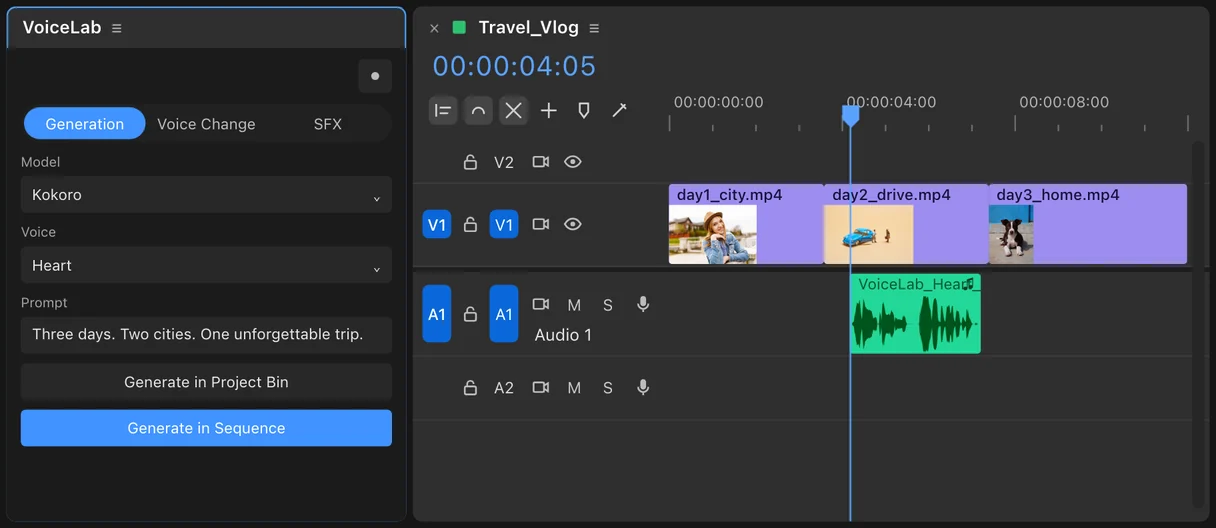
Premiere Pro doesn't have text to speech on the timeline. Adobe's AI voice tool, Generate Speech, lives in the Firefly web app, so the usual way to add an AI voiceover is a round trip: write the script in a browser, generate, download the file, import it and line it up. VoiceLab puts text to speech inside the Premiere and After Effects panel instead: type the script, pick a voice, and the voiceover lands at your playhead. The built-in voices are free and run offline, and you can add your own ElevenLabs key for premium voices.
Editors use AI voiceovers for scratch tracks before the real VO session, for explainers and social cuts where a voice actor isn't in the budget, and for versions in other languages. This guide covers what Adobe offers, the round trips, the in-panel way, and how to get a voice that doesn't sound read off a card.
Does Premiere Pro have text to speech?
Not on the timeline. Here's what Adobe has, as of October 2026.
- Speech to Text in Premiere is the opposite direction: it transcribes dialogue for captions and text-based editing. The "language packs" Premiere asks you to download are for this, not for generating a voice.
- Generate Speech is in the Firefly web app (Audio, Generate speech). You paste a script or import a DOCX or TXT file and pick Adobe's Firefly Speech model or a partner model such as ElevenLabs Multilingual v2. Adobe lists it as a beta.
- Voice-over Record (the microphone button on an audio track header) records your own voice straight into Premiere. Great for scratch tracks, if you don't mind hearing yourself.
After Effects has no text to speech either.
| Method | Where it runs | Cost | Offline? | The catch |
|---|---|---|---|---|
| Firefly Generate Speech | Firefly web app | Firefly plan | No | Beta, browser round trip |
| ElevenLabs website | Browser | Free tier, then $6 to $99 a month | No | Download and import every take |
| Your own mic | Premiere | Free | Yes | It's your voice |
| VoiceLab, local voices | Premiere and After Effects | $57 once | Yes | Nine languages and accents |
| VoiceLab, ElevenLabs voices | Premiere and After Effects | $57 once plus your ElevenLabs plan | No | Needs your own API key |
Method 1: the browser round trip
- Paste the script into Firefly Generate Speech, ElevenLabs or another voice site.
- Pick a voice and generate.
- Download the audio file.
- Import it into Premiere and drag it onto the timeline.
- Line it up with the picture and cut it to the edit.
It works. The cost shows up on revisions: the client wants line 4 faster, or a different voice entirely, and you go back to step 1 for every take. On most voice sites, each regeneration uses credits too.
Method 2: generate it in the panel
This is what VoiceLab does.
- Install VoiceLab with the free aescripts + aeplugins Manager app and open the panel in Premiere or After Effects.
- Choose an engine. Kokoro is free and runs on your computer. ElevenLabs uses your own API key.
- Type or paste the script in the Prompt field on the Generation tab, and pick a voice.
- Click Generate in Sequence to drop the voiceover at the playhead (in After Effects, into the composition), or Generate in Project Bin to keep it in the bin.
A changed line is a new take in the same panel. The same panel also changes the voice on an audio clip already in your edit (Voice Change) and generates sound effects from a description; those two use ElevenLabs.
Free and offline: the Kokoro voices
VoiceLab's local engine is Kokoro, an open-weight text-to-speech model. It runs on a normal editing machine without a high-end GPU, and nothing you type leaves your computer, which matters under an NDA or in an offline edit bay. Kokoro output is commercially usable with no forced attribution.
Languages and accents: American English, British English, Mandarin Chinese, Japanese, Spanish, French, Hindi, Italian and Brazilian Portuguese.
A good split: draft every line with Kokoro while you cut, then regenerate the hero lines with ElevenLabs if the job calls for it. Both engines are in the same dropdown.
How to make an AI voiceover sound less robotic
- Write for the ear. Short sentences, one idea each. A sentence that reads well can sound breathless out loud.
- Punctuation is direction. Commas give short pauses, full stops give longer ones. A line break between sentences often helps.
- Spell out anything ambiguous. Write "twenty twenty-six" or "two thousand", "four K", and brand names the way they're said.
- Generate a few takes of the key line and keep the best one, the same as with a voice actor.
- Cut the breaths between lines, not inside them. Leave a few frames of room tone.
- Mix it like real dialogue. A touch of EQ and compression, and duck the music under it.
Can you use AI voiceovers commercially?
With VoiceLab's local Kokoro voices, yes, with no attribution required. ElevenLabs voices follow ElevenLabs' terms for your plan, and free plans don't include commercial use. Firefly follows Adobe's generative AI terms. Don't clone a real person's voice without their permission.
Frequently asked questions
Does Premiere Pro have text to speech? No. Premiere's Speech to Text transcribes speech for captions. Adobe's Generate Speech is in the Firefly web app, so you download the file and import it.
What is the text to speech language pack in Premiere? It's for Speech to Text (transcription), not for generating voices.
Is there free text to speech for Premiere Pro? VoiceLab's Kokoro voices are free to use after the one-time purchase, run offline, and have no credits or per-word fees.
Do I need an ElevenLabs account? Only for ElevenLabs voices, Voice Change and sound effects. The local voices need no account or key.
Does it work in After Effects? Yes. VoiceLab generates into the project or at the playhead in a composition.
Which systems does it run on? Premiere Pro and After Effects CC 2022 or later, on macOS with Apple Silicon and on Windows.
Sources
- Adobe Help: Generate speech from text in Firefly
- Adobe Help: What's new in Firefly
- ElevenLabs pricing
- Kokoro on Hugging Face
Adobe, Premiere, After Effects and Firefly are trademarks of Adobe. ElevenLabs is a trademark of its owner. vogeledits is not affiliated with Adobe or ElevenLabs. Prices checked October 2026.